Security Speaker Units & Alarm System Integration: How to Ensure Seamless Triggering (No Delays)
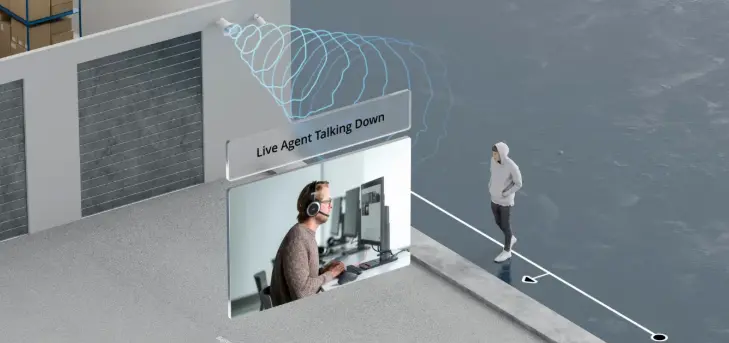
A security speaker that doesn’t integrate with your alarm system is just a loudspeaker—It won’t automatically play an alert when a door is forced open, a window is broken, or a trespasser is detected. We’ve seen security teams manually trigger speakers during emergencies—wasting precious seconds that could mean the difference between stopping a theft and losing inventory.
The key to effective security audio is seamless integration—your speakers should work in lockstep with your alarm panel, cameras, motion sensors, and access control. Let’s break down how to integrate security speakers with common alarm systems (wired, wireless, IP-based), fix integration delays, and ensure reliable triggering for emergencies.
First: Why Integration Matters for Security Speakers
Without integration, your security system is fragmented:
- A motion sensor detects a trespasser, but the speaker only plays an alert if someone presses a button.
- An alarm goes off, but the speaker plays the wrong message (e.g., fire alert for a break-in).
- Delays between alarm trigger and speaker alert give intruders time to escape.
Integrated systems solve this:
- Automatic Triggering: A broken window → alarm panel → speaker plays “Trespasser detected—security en route” in 1 second or less.
- Contextual Alerts: Different threats trigger different messages (fire → evacuation, break-in → trespass alert).
- Central Management: Update alerts (e.g., change “security en route” to “police en route”) from a single dashboard—no need to visit each speaker.
How to Integrate Security Speakers with Common Alarm Systems
Different alarm systems use different protocols—choose a speaker that matches your setup:
1. Wired Alarm Systems (Legacy Panels: Honeywell, ADT)
- Protocol: RS485 (most common for wired security).
- Integration Steps:
- Connect the speaker’s RS485 port to the alarm panel’s RS485 output (use shielded cable to avoid interference).
- Program the alarm panel to send trigger signals to the speaker (e.g., “Zone 1 breach → play Alert 1”).
- Test: Trigger a zone breach (e.g., open a test door)—the speaker should play the correct alert in <1 second.
- Key Speaker Feature: RS485 compatibility + support for “zone-based triggers” (different zones = different alerts).
- Example: A retail store with a Honeywell wired panel integrated RS485 speakers—breaches in the electronics zone trigger a specific alert, while backdoor breaches trigger another.
2. Wireless Alarm Systems (SimpliSafe, Ring)
- Protocol: Wi-Fi or Z-Wave (wireless communication).
- Integration Steps:
- Choose a Wi-Fi-enabled security speaker (compatible with your panel’s app).
- Pair the speaker to the alarm panel via the app (follow panel-specific steps—e.g., “Add Device” in Ring app).
- Map triggers: Assign alerts to events (e.g., “Motion in backyard → play ‘Leave the property’”).
- Key Speaker Feature: Low-latency Wi-Fi (≤100ms trigger delay) + battery backup (works if power is cut).
- Mistake to Avoid: A homeowner used a generic Wi-Fi speaker—trigger delay was 3 seconds, giving a trespasser time to hide. Switching to a security-grade Wi-Fi speaker cut delay to 50ms.
3. IP-Based Security Systems (Modern: Hikvision, Dahua)
- Protocol: TCP/IP (Ethernet or POE).
- Integration Steps:
- Connect the POE security speaker to your IP network (one cable for power and data).
- Log into your IP security dashboard—add the speaker as a “peripheral device.”
- Set up “event-action” rules (e.g., “Camera detects motion → trigger speaker in that zone to play alert”).
- Key Speaker Feature: POE support (simplifies wiring) + remote alert management (update messages from anywhere).
- Example: A warehouse with a Hikvision IP system uses POE speakers—cameras detect forklift collisions, and the nearest speaker plays “Stop—collision risk” instantly.
How to Fix Integration Delays & Failures
Delays (≥2 seconds) or failed triggers are the biggest integration issues—here’s how to fix them:
1. Delay Cause: Signal Interference (Wired/Wireless)
- Fix for Wired: Use shielded RS485 cables (blocks electrical interference from other wires). Keep cables 6 inches away from power cables.
- Fix for Wireless: Place the speaker within 30ft of the alarm panel (reduces Wi-Fi/Z-Wave interference). Add a range extender if needed.
2. Delay Cause: Overloaded Alarm Panel
- Fix: Update the panel’s firmware (old firmware slows trigger speed). If the panel is >5 years old, upgrade to a newer model that handles more devices.
3. Failed Trigger: Mismatched Protocols
- Fix: Ensure the speaker uses the same protocol as the panel (e.g., don’t use a Z-Wave speaker with a Wi-Fi-only panel). Check the panel’s manual for compatible protocols.
4. Failed Trigger: Incorrect Programming
- Fix: Re-program the panel to send the right signal (e.g., some panels need a “digital trigger” instead of an “analog trigger”). Test each zone individually to catch programming errors.
Critical Integration Feature: Emergency Broadcast
Choose speakers with “emergency broadcast” capability—this lets you send live voice messages (e.g., “Evacuate to the north exit now”) during crises that aren’t pre-programmed (e.g., active shooter, gas leak).
A school used this feature during a storm—administrators sent a live message to all speakers, guiding students to safe rooms faster than pre-recorded alerts.