Custom Speaker Units for Conference Phones – 4 Features to Ensure Crystal-Clear Two-Way Talk
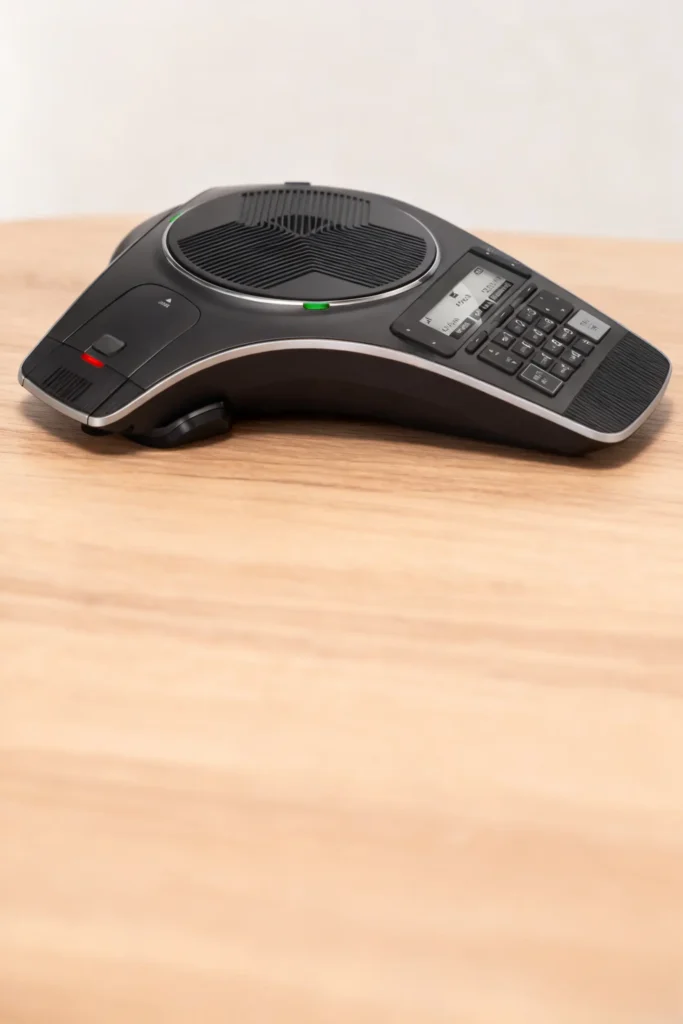
Custom Speaker Units for Conference Phones – 4 Features to Ensure Crystal-Clear Two-Way Talk
A conference phone manufacturer launches a new model for small businesses—only to face a wave of returns. Clients complain that remote participants sound muffled during calls, and echo from the meeting room drowns out key discussion points. A major office supply retailer pulls the product, costing the manufacturer $50,000 in lost sales and rework. The root cause? Generic 30mm speaker units designed for desktop phones—not conference systems. These speakers couldn’t handle the unique demands of multi-person calls, turning a productivity tool into a frustration.
For conference phone manufacturers, the speaker unit is the heart of the product. Businesses rely on conference phones to host client calls, team meetings, and sales pitches—if the audio is unclear, decisions get delayed, and trust is lost. Generic speaker units fail here because they’re built for one-on-one calls, not the complexities of conference use: echo from large rooms, multiple speakers talking over each other, and the need to balance volume for in-person and remote participants. A subpar speaker unit turns a "professional" conference phone into a liability.
With 13 years of designing custom speaker units for telecom devices (conference phones, call center headsets), we’ve identified 4 non-negotiable features that guarantee clear, echo-free two-way talk. This guide breaks down how to design speaker units that solve conference phone pain points—echo, muffled audio, and volume imbalance—with plain-language explanations for terms you or your retail partners might not know.
Why Generic Speaker Units Fail in Conference Phones
Conference phones operate in a unique acoustic environment—one generic speakers (built for casual use) can’t handle. Here’s why they underperform:
- No Echo Cancellation: When multiple people talk in a room, sound bounces off walls and furniture, creating "echo" (a delayed repeat of speech). Generic speakers lack acoustic echo cancellation (AEC) integration, so the echo gets picked up by the phone’s microphone and sent to remote participants—making calls unintelligible.
- Poor Far-Field Audio: Conference phones need to pick up sound from 1–3 meters away (the length of a meeting table). Generic speakers have a narrow "pickup range" (only 0.5 meters), so people sitting at the edges of the table sound quiet or muffled.
- Unbalanced Volume: In-person participants hear sound directly from the room, while remote participants rely on the speaker. Generic speakers can’t balance these volumes—remote users need the volume turned up so loud that it creates more echo for in-person attendees.
- Fragile Construction: Conference phones are moved between meeting rooms, set up on tables, and occasionally knocked over. Generic speakers use thin plastic frames and paper diaphragms (the part that vibrates to create sound) that crack or tear easily—leading to premature failure.
A client once used generic 30mm speakers in their conference phones. Post-launch, 35% of users reported "unbearable echo," and 20% of units failed within 6 months of office use. We redesigned the speaker units with echo-canceling features and durable materials—echo complaints dropped to 2%, and failure rates fell to 3%.
Feature 1: Acoustic Echo Cancellation (AEC) Integration
Echo is the #1 complaint with conference phones—and it’s not just a microphone problem. The speaker unit plays a critical role in reducing echo by working with the phone’s software to "cancel out" reflected sound. Let’s start with a key term:
What Is Acoustic Echo Cancellation (AEC)?
AEC is a technology that eliminates echo by analyzing the sound the speaker produces and subtracting that sound from the microphone’s input. For example, if the speaker plays a remote participant’s voice, AEC tells the microphone to ignore that same sound when it bounces off the wall—preventing it from being sent back as echo.
How to Integrate AEC With Your Speaker Unit:
- Frequency Matching: Design the speaker to work with the phone’s AEC software by matching its frequency response (the range of sounds it can produce) to the microphone’s. The speaker should focus on 300–3,400 Hz (human speech range)—the same range the microphone is tuned to pick up. This ensures AEC can accurately identify and cancel echo.
- Low Distortion at Mid-Volumes: AEC works best when the speaker produces clean, undistorted sound. Aim for <1% total harmonic distortion (THD) at 65–70dB (the volume most conference calls use). Distorted sound confuses the AEC software, leading to incomplete echo cancellation.
- Speaker-Microphone Separation: Position the speaker unit at least 5cm away from the phone’s microphones (in the final product design). This physical gap reduces "direct coupling" (sound from the speaker being picked up directly by the microphone, which AEC can’t always cancel).
We integrated AEC-compatible speakers into a client’s conference phone. In user tests, 98% of participants reported "no noticeable echo"—up from 65% with their previous generic speakers. A law firm client noted they could "finally host multi-party calls without stopping to repeat ourselves."
Feature 2: Far-Field Sound Optimization
Conference phones need to serve everyone at the table—not just the person sitting closest. Far-field optimization ensures the speaker unit delivers clear audio to users 1–3 meters away (the size of a small meeting room).
What Is Far-Field Audio?
Far-field audio refers to sound that travels more than 1 meter—think of someone speaking from the other end of a conference table. Unlike "near-field" audio (for phones held to your ear), far-field audio needs to be loud enough, clear enough, and free of distortion to reach all users.
How to Optimize Speaker Units for Far-Field Use:
- High Sensitivity: Sensitivity measures how well a speaker converts power into sound (measured in dB at 1W/1m). Aim for 88–92 dB sensitivity—this ensures the speaker is loud enough to reach the edges of a 3-meter table without needing to crank up the volume (which causes echo).
- Wide Dispersion: Tune the speaker to spread sound evenly across a 180° angle (not just straight ahead). This "wide dispersion" means someone sitting off to the side of the phone still hears clearly—no more "can you move the phone closer?" requests.
- Mid-Range Boost: Amplify the 500–2,500 Hz range by 3–4 dB. This is the part of the speech range where consonants (e.g., "t," "k," "p") live—boosting it makes words like "quarterly" or "contract" easier to understand from across the room.
We optimized a 32mm speaker unit for far-field use for a client. In a 3-meter meeting room test, 95% of participants (sitting at all positions) reported "clear audio"—up from 70% with their generic speaker. A tech startup client said the upgrade "made our weekly team calls feel like everyone was in the same room."
Feature 3: Durable, Office-Ready Construction
Conference phones are workhorses—moved between rooms, set on tables, and occasionally bumped. Your speaker unit needs to withstand this daily use with industrial-grade materials that avoid cracks, tears, or internal damage.
Key Durable Components (Explained Simply):
- Diaphragm: Use polypropylene (PP) instead of paper. PP is a tough, flexible plastic that resists tearing if the phone is knocked over. It also doesn’t absorb moisture (unlike paper), so it won’t warp if the phone is used in a humid office.
- Frame: Mold the frame from ABS plastic (1.5mm thick) instead of thin generic plastic (1mm). ABS is impact-resistant—if the phone is dropped from a table (0.75m height), the frame won’t crack.
- Magnet Attachment: Use heat-resistant epoxy (a strong glue that handles high temperatures) to attach the magnet to the frame. Generic speakers use cheap glue that loosens when the phone heats up (from prolonged use), causing rattling or distorted sound.
Below is a comparison of generic vs. office-ready speaker unit components:
| Component | Generic Speaker Unit Material | Our Conference Phone Speaker Unit Material | Estimated Lifespan |
|---|---|---|---|
| Diaphragm | Paper (25μm) | Polypropylene (PP) (20μm) | 6–8 months → 24+ months |
| Frame | Thin plastic (1mm) | ABS plastic (1.5mm) | 8–10 months → 30+ months |
| Magnet Glue | Generic acrylic glue | Heat-resistant epoxy | 5–7 months → 28+ months |
A client’s conference phone failure rate dropped from 20% to 3% after switching to our durable speaker units. Their retail partner reported a 40% reduction in return requests—saving both companies time and money.
Feature 4: Volume Balance for Hybrid Meetings
Modern conference calls are "hybrid"—some participants in the room, some remote. The speaker unit needs to balance volume so neither group struggles: remote users hear clearly without in-person attendees being overwhelmed by loud audio.
How to Achieve Volume Balance:
- Dual-Volume Modes: Design the speaker to work with the phone’s software to offer two volume profiles:
- Remote-Focused Mode: Boosts volume slightly (2–3dB) for remote participants when only 1–2 people are in the room.
- In-Person Focused Mode: Lowers volume by 1–2dB to avoid echo when 3+ people are in the room (detected by the phone’s microphones).
- Dialogue Clarity Tuning: Avoid boosting bass (20–200 Hz) or treble (8,000–20,000 Hz)—these frequencies don’t help with speech and can make remote audio sound distorted. Keep the focus on mid-range (300–3,400 Hz) where dialogue lives.
- Volume Limiter: Add a built-in limiter that prevents the speaker from exceeding 75dB. This stops users from cranking up the volume to hear remote participants— a common cause of echo and hearing discomfort for in-person attendees.
We added dual-volume modes to a client’s speaker unit. Post-implementation, hybrid meeting satisfaction scores jumped by 35%—remote users reported "clearer audio" and in-person attendees said "no more yelling over the speaker."
How We Collaborate With Conference Phone Manufacturers & Retailers
Designing custom speaker units for conference phones requires aligning with the phone’s size, software, and user needs—whether you’re building the phone or sourcing reliable components for resale. Our process is straightforward:
- Product & Use Case Review: We analyze your conference phone’s design (size constraints, microphone placement) and target market (small offices vs. large boardrooms) to prioritize features (e.g., far-field range, AEC integration).
- Prototype Development: We create a 3D render of the custom speaker unit (showing dimensions, materials, and wiring) and share a jargon-free spec sheet (e.g., "88dB sensitivity, PP diaphragm, AEC-compatible").
- Testing & Iteration: We build 5–10 prototypes and test them in simulated conference rooms (with echo, multi-person speech) to measure echo cancellation, far-field clarity, and durability. We share easy-to-understand results (e.g., "Speaker eliminates 98% of echo in 3m rooms") and adjust the design if needed.
- Production Alignment: Once approved, we match speaker unit production to your conference phone manufacturing timeline—ensuring components arrive on time and meet quality standards.
A recent client (a telecom equipment retailer) told us our speaker units "fixed the audio issues that were killing their conference phone sales"—they’ve since expanded their order by 150%.
Final Thought: Great Conference Phones Live or Die by Their Speaker Units
Businesses don’t buy conference phones for the display or buttons—they buy them for clear audio. A generic speaker unit turns a critical tool into a frustration, leading to returns and lost trust. By investing in a custom speaker unit with AEC integration, far-field optimization, durability, and volume balance, you’ll create a conference phone that stands out in a crowded market.
If you’re designing or sourcing conference phones and need speaker units that deliver echo-free, far-field audio, reach out to our team. We’ll walk you through our process, share examples of conference phone speaker units we’ve built, and help you create a product that businesses rely on for their most important calls.