Designing Audio Solutions for Smart Conference Rooms – 5 Must-Have Features for Seamless Meetings

Designing Audio Solutions for Smart Conference Rooms – 5 Must-Have Features for Seamless Meetings
A corporate client sits down for a $500,000 deal pitch with a potential partner. The meeting starts, and the conference room’s audio system fails: the presenter’s voice is muffled, echo drowns out the client’s questions, and the speaker cuts out mid-demo. By the time the IT team fixes it, 30 minutes of the 60-minute meeting are gone—and the client walks away without signing.
For AV integrators and corporate facilities teams, poor conference room audio isn’t just an inconvenience—it’s a revenue killer. Smart conference rooms are supposed to make meetings easier, but generic audio solutions (e.g., a single ceiling speaker, basic microphones) can’t handle the complexity of modern meetings: hybrid teams (in-person + remote), multiple presenters, and high-stakes client calls.
With 13 years of designing custom audio solutions for conference rooms—from small huddle spaces to 50-person boardrooms—we’ve identified the 5 features that separate "frustrating" from "seamless" audio. These features ensure every voice is heard, every call is clear, and every meeting stays on track—and they’re tailored to the way businesses actually use conference rooms today.
Why Generic Audio Fails in Smart Conference Rooms
Before diving into the must-have features, let’s understand why off-the-shelf audio products (designed for homes or small offices) don’t work in smart conference rooms. They lack three critical capabilities that business meetings demand:
- Hybrid Meeting Support: 70% of companies now use hybrid meetings (Gartner, 2024), but generic speakers/mics only focus on in-person audio. Remote attendees end up hearing garbled voices or nothing at all—creating a "two-tier" meeting experience.
- Echo & Background Noise Cancellation: Conference rooms have hard surfaces (walls, tables) that reflect sound, causing echo. Add in office background noise (hallway chatter, HVAC systems), and generic audio can’t filter out the chaos—remote attendees hear more static than conversation.
- Scalability: A small huddle room needs 2 microphones; a large boardroom needs 8+. Generic systems are "one-size-fits-all"—you can’t add mics or adjust sound coverage without replacing the entire system.
A client once installed a generic ceiling speaker system in their 20-person conference room. Hybrid meetings became a disaster: remote attendees complained they couldn’t hear people sitting at the back, and echo made presentations unreadable. We redesigned the system with the 5 features below, and their hybrid meeting satisfaction score jumped from 3/10 to 9/10.
Must-Have Feature 1: Multi-Zone Microphone Arrays (Cover Every Seat)
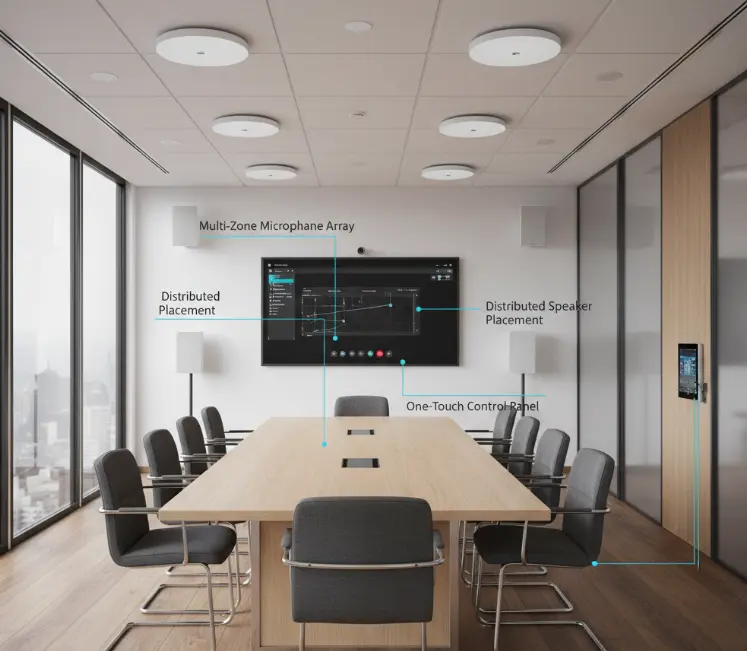
The #1 complaint in conference rooms is "people at the back can’t be heard." This happens because generic systems use 1–2 microphones placed at the front—sound fades as you move away from them. The solution: multi-zone microphone arrays that cover every seat in the room.
How It Works:
- Install 1 microphone array per 4–6 seats (e.g., a 20-person room needs 4–5 arrays).
- Position arrays on the ceiling (for unobtrusive design) or table (for smaller rooms).
- Use "beamforming" technology: each array focuses on a specific zone (e.g., the back left of the room) and ignores sound outside that zone—reducing background noise.
For example, we installed 5 ceiling-mounted beamforming mic arrays in a 25-person boardroom for a tech company. Each array covered a 4-seat zone, and remote attendees reported they could "hear every person, even those sitting in the corner."
Key Spec to Look For:
- Pickup Range: Each array should cover 3–4 meters (enough for 4–6 seats).
- Noise Cancellation: Ensure arrays have AI-powered noise suppression (blocks HVAC, keyboard typing, and hallway chatter).
Must-Have Feature 2: Echo Cancellation Tuned for Hard Surfaces
Conference rooms are filled with hard, sound-reflective surfaces (drywall, glass, wooden tables)—the perfect environment for echo. Generic audio systems use basic echo cancellation, but it’s no match for a large room with 10+ people talking. You need room-specific echo tuning to eliminate this issue.
How It Works:
- Before installing the system, measure the room’s "reverb time" (how long sound bounces off surfaces). A large room with high ceilings may have a reverb time of 1.5 seconds—double that of a small huddle room.
- Tune the audio system’s echo canceller to match the reverb time. For example:
- A small huddle room (reverb time 0.5s) needs mild echo cancellation.
- A large boardroom (reverb time 1.5s) needs aggressive cancellation.
- Use "adaptive echo cancellation" that adjusts in real time (e.g., if the room fills with people, the system increases cancellation to account for more sound reflections).
We worked with a law firm that had a glass-walled conference room (worst for echo). We measured the reverb time at 1.2s, tuned the echo canceller to match, and added absorption panels (small, unobtrusive) to reduce reflections. Their lawyers reported "no more echo during client calls—we can finally have clear conversations."
Key Spec to Look For:
- Reverb Time Handling: The system should support reverb times up to 2 seconds (covers most conference rooms).
Must-Have Feature 3: Compatibility With Hybrid Meeting Tools
Your audio system is only as good as its ability to work with the tools the team actually uses: Zoom, Microsoft Teams, Google Meet, and Cisco Webex. Generic systems often require clunky adapters or don’t support all features (e.g., Teams’ "raise hand" audio notification). You need native integration with these platforms.
How It Works:
- Choose a system that’s "certified" for major meeting tools (look for logos like "Zoom Rooms Certified" or "Microsoft Teams Rooms Ready").
- Native integration means:
- The system auto-adjusts audio levels when someone joins a Teams call.
- Microphones and speakers work with the tool’s built-in noise cancellation (no double-filtering that muddles sound).
- You can control the audio system from the meeting tool (e.g., mute mics via Zoom’s interface).
We installed a Teams-certified audio system in a 15-person conference room for a marketing agency. Their team loved that they could "mute all mics or adjust volume directly in Teams—no need to fumble with a separate remote."
Key Compatibility Check:
- Ensure the system supports both wired (USB-C, HDMI) and wireless (Bluetooth, Wi-Fi) connections to laptops/meeting room PCs.
Must-Have Feature 4: Balanced Speaker Coverage (No Loud/Quiet Spots)
A conference room audio system fails if some seats are too loud (front row) and others are too quiet (back row). Generic systems use 1–2 large speakers at the front, creating "hot spots" and "dead zones." The solution: distributed speaker placement for balanced coverage.
How It Works:
- Install 2–4 small speakers (not 1 large one) evenly around the room:
- A small huddle room (6–8 people): 2 speakers (front left/right).
- A medium room (10–20 people): 4 speakers (front left/right, back left/right).
- Tune each speaker’s volume to ensure consistent sound levels (70–75 decibels) across every seat. Use a sound level meter to test—this avoids guesswork.
For a 30-person training room, we installed 4 wall-mounted speakers (2 front, 2 back) and tuned them to 72dB at every seat. The training team reported "no more complaints about being unable to hear the presenter—everyone gets the same volume."
Key Spec to Look For:
- Speaker Sensitivity: Look for 85–90 dB (1W/1m) — these speakers deliver enough volume without distortion.
Must-Have Feature 5: Simple, Intuitive Controls (No IT Degree Needed)
The best audio system is useless if the team can’t operate it. Generic systems come with complicated remotes or apps that require IT support to use—wasting time before meetings. You need one-touch controls that anyone can master in 30 seconds.
How It Works:
- Install a wall-mounted touchscreen (5–7 inches) near the conference room door with 4–5 basic buttons:
- "Start Meeting" (turns on mics/speakers, connects to the meeting tool).
- "Mute All Mics".
- "Adjust Volume" (slider for easy tweaks).
- "End Meeting" (turns off system, saves power).
- Add voice commands (optional) for hands-free use (e.g., "Hey Conference Room, mute mics").
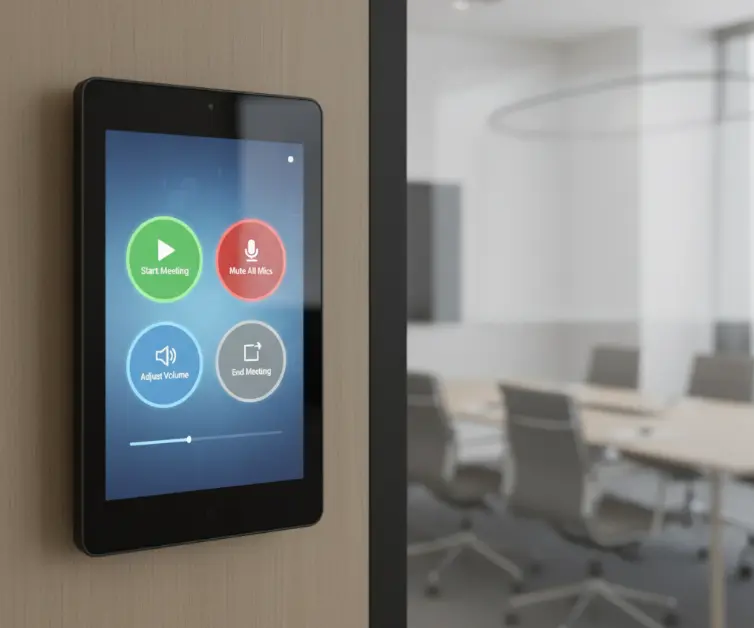
We added a touchscreen control panel to a 12-person conference room for a healthcare company. Their staff reported "we no longer wait 10 minutes for IT to set up the audio—anyone can start a meeting in 2 clicks."
Key Design Tip:
- Keep the touchscreen simple—avoid more than 5 buttons. Too many options lead to confusion.
How We Design Custom Conference Room Audio Solutions
Every conference room is unique (size, shape, usage), so a one-size-fits-all system won’t work. Our process is tailored to your space and team’s needs:
- Room Assessment: We visit your site (or review floor plans) to measure size, identify hard surfaces, and understand how the room is used (e.g., "20-person hybrid client meetings 3x/week").
- Solution Proposal: We share a 3D render of the system (mic/speaker placement, touchscreen location) and a spec sheet with features tailored to your needs (e.g., Teams certification for a remote-heavy team).
- Prototype Testing: We install a temporary system for 1 week to test performance. We gather feedback from your team (e.g., "Can remote attendees hear people in the back?") and adjust before final installation.
- Training & Documentation: We train your team to use the system (15-minute session) and provide a one-page guide for quick reference.
A recent client had a glass-walled conference room that was "impossible to get good audio in." We followed this process, and their facilities manager said, "It’s like a different room—meetings are faster, and clients comment on how clear the audio is."
Final Thought: Conference Room Audio Is an Investment in Productivity
Poor audio wastes 15–20 minutes per meeting (average for 10-person teams) — that’s 80+ hours per year in lost productivity. By adding these 5 features, you’re not just improving audio—you’re making meetings more efficient, client calls more successful, and your team happier.
If you’re designing a smart conference room and want audio that works for hybrid teams, clear conversations, and easy operation, reach out to our team. We’ll assess your space, share examples of similar projects, and design a solution that fits how your business actually meets.